


HonkMobile: Pay for Parking
4.4191.00 Reviews
App Specs
- Version
- 6.18.1
- Updated On
- License
- Free
- Downloads
- 1,000,000+
- Developer
- HonkMobile
- Categories
- Maps & Navigation
- Platform
- Android
Screenshots
 Analysis by AppCompare
Parking apps are easiest to appreciate when you are already late, circling a busy street, or standing beside a meter that is awkward to reach. I tested HonkMobile: Pay for Parking with that kind of practical situation in mind, and my overall impression is that it makes paid parking feel more manageable without trying to replace every navigation tool on my phone. Its purpose is focused: help me search for parking, find a suitable place, and pay through the app instead of relying on a traditional meter.
That focus matters. HonkMobile is a free Maps & Navigation app from HonkMobile, available to everyone and built for drivers who regularly park in supported locations. It has been around since February 4, 2014, and its current version is 6.18.1, with Android support starting at version 5.1. The app has passed one million installs and holds a 4.4 average from roughly 7.5 thousand ratings, while the store shows 191 written reviews. Those figures suggest an established service rather than a brand-new experiment, although popularity alone is not a substitute for checking whether it covers the places I actually visit.
What using HonkMobile feels like in real parking situations
I find HonkMobile most useful when I treat it as one step in a parking routine, not as a shortcut around checking the street. I first identify the zone on the sign, then compare it with the location shown in the app and review the session before paying; that small pause is especially valuable when several parking areas sit close together. Once the transaction is settled, I keep the confirmation easy to reach, which leads naturally to the habits that make repeat visits smoother.
A focused alternative to the old meter routine
The first thing I noticed is that HonkMobile is not trying to be a full replacement for a general map app. I would still use a familiar navigation app to plan a long drive, compare routes, or understand traffic. HonkMobile becomes useful closer to the destination, when the question changes from “How do I get there?” to “Where can I legally leave the car, and how do I pay?”
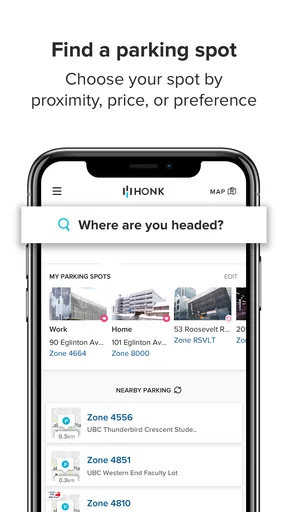
That distinction gives it a clear role. Instead of walking to a meter, looking for coins, or trying to read a small payment screen in bad weather, I can use the phone-based parking workflow. The store summary describes the central experience as searching, finding, and paying for parking, and that is exactly the right way to understand the product. It is a parking companion, not an all-purpose travel planner.
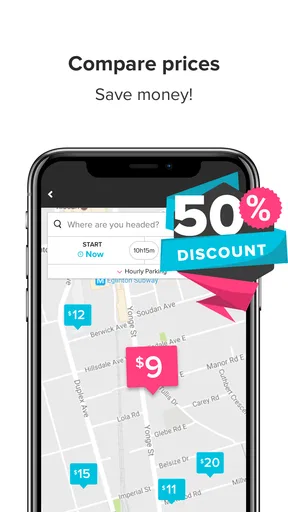
In an everyday scenario, I might drive downtown for an appointment and arrive with only a short amount of time before check-in. I can open the app near the destination, look for available parking options shown through its service, and decide whether the convenience is worth the location or cost displayed at that moment. The useful part is not simply seeing a map; it is keeping the search and payment steps together instead of switching between a street sign, a meter, and a separate payment process.
Where the app saves time, and where it cannot
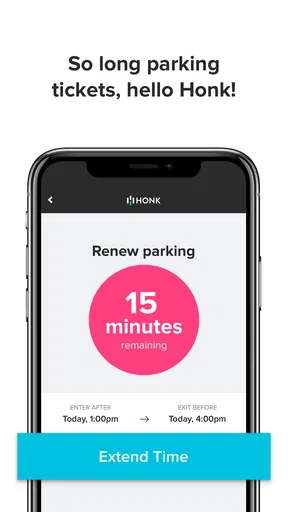
The biggest benefit is reduced friction after I have already chosen to park. A digital payment flow can be more comfortable than handling a public machine, especially when I am carrying bags, dealing with children, or parking after dark. It can also help me avoid the familiar problem of returning to a vehicle just to extend a session, provided the particular parking location supports the relevant in-app action.
Worth Reading Before You Choose

EA SPORTS FC Mobile 26 Is a Bigger Football Game, but It Takes Time

Flipboard Shows What News Apps Must Do Beyond the Feed

Switching to Android Auto Means Rethinking Your Driving Routine

Google Calendar Makes a Crowded Week Easier to Manage

Ludo King Makes the Most of the Minutes Between Plans

Baby Panda World Brings Quick Play to Modern Phones, but Its Game Library Feels Busy
That last qualification is important. I would not assume that every parking space, garage, or city uses HonkMobile. Coverage is the first practical question, and the app is only helpful when the location is included in its service. I would check the destination before depending on it for an appointment or event. A standard meter, a garage’s own system, or a city-operated parking app may still be the better choice in places where HonkMobile is not accepted.
I also would not treat the map as permission to park anywhere nearby. The app can assist with finding and paying, but street signs, curb markings, time restrictions, resident rules, loading zones, and temporary notices still matter. My best habit is to use the app for the transaction while reading the physical signs for the legal conditions. That two-step check prevents a convenient payment from creating a parking violation.
The trust question is mostly about visible choices
Because this app handles parking payments, trust is more important than a polished map. I want to know what I am confirming, which vehicle or parking session I am paying for, and whether the final details are visible before I submit anything. A good parking workflow should make the location, duration, and amount understandable rather than encouraging a rushed tap.
My advice is to slow down at the confirmation stage. Check the zone or location identifier against the sign beside the car, verify the vehicle details if the app asks you to choose among them, and review the selected parking period. This is one of the less obvious ways to use the app safely: the phone can make payment easier, but it can also make an incorrect selection feel deceptively quick.
I would also review the permission prompts and account screens as they appear on my own device, rather than granting access automatically. Permissions can vary by operating system and app version, so I would judge each request by whether it makes sense for the task I am performing. If the app asks for something I do not understand, I would pause and inspect the explanation or decline it until I know why it is needed. That approach keeps the decision with me instead of treating every prompt as part of the parking fee.
Account control matters more than convenience
A parking account can save time on repeat visits, but it also creates a reason to keep personal and payment details organized. I would use a clear email address that I check regularly, keep vehicle information accurate, and avoid leaving old vehicles or unnecessary details in the account. If I sold a car or changed registration information, updating the profile would be one of the first things I did before using the app again.
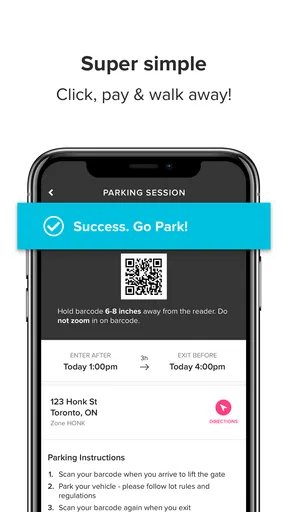
Payment confirmation deserves the same attention. I would look for the exact session information after paying and keep the confirmation available until I leave the parking area. That is especially useful when a plate number, zone, or expiry time is easy to confuse. A screenshot or accessible confirmation can make it easier to resolve a question later, although I would not rely on a screenshot instead of checking the live session status when the app provides one.
I also prefer not to stay signed in on a shared phone or lend my unlocked device while a payment account is open. The app is designed for personal parking use, and basic phone security remains part of the experience. A strong screen lock and careful review of account controls are simple precautions that do more for trust than any attractive interface.
Data-sensitive moments during a parking session
The most sensitive moments are not necessarily when I browse the map. They are when I create or access an account, enter payment information, identify a vehicle, choose a parking location, and confirm a session. Each action connects the parking event to information about me or my car, so I would pay closer attention at those points than while casually exploring nearby options.
I would read the app’s current privacy and account information from within the official store or the app itself before entering details, because policies and controls can change independently of the version number shown on a device. I would also check what options are available for notifications, saved vehicles, payment methods, and account management. The important principle is not to assume that a convenient default is the only choice.
Notifications can be useful when they remind me about a parking session, but I would decide whether their wording is appropriate for my lock screen. If a phone is shared or visible to other people, a discreet notification setting may be preferable. This is a small but practical privacy decision: parking reminders are helpful, yet the message should not reveal more than I want displayed publicly.
Location access deserves a similarly practical approach. If I am searching for parking around my current destination, location can make the map easier to use. If I already know the area and prefer to search manually, I would consider whether continuous access is necessary for my use. I would make that choice through the operating system’s controls and revisit it later if my habits change, rather than treating the initial permission as permanent.
How it compares with meters, general map apps, and local services
Compared with a traditional parking meter, HonkMobile is more convenient when the location supports it and when I already have my phone ready. I do not need to walk back to the machine for every adjustment, and the payment process can stay connected to the parking session. The meter still wins when I want a completely physical transaction, when my phone battery is low, or when the location does not accept the app.
Compared with a general map app, HonkMobile has a narrower but more useful parking purpose. A map app may be better for discovering businesses, planning the drive, checking traffic, or navigating the final route. HonkMobile is more relevant once parking payment becomes the main problem. I see them as complementary rather than competing tools: use the general map to reach the area, then use the parking app to handle the supported parking transaction.
Compared with a city or garage-specific parking service, the better option depends on coverage and the place I am visiting. A local service may provide more detailed information for one municipality or facility, while HonkMobile can be attractive to someone who wants one familiar parking workflow across locations where it is supported. I would not choose based only on the brand name. I would compare the displayed location, rules, payment steps, and account requirements at the exact destination.
Small habits that make the app safer and more useful
My first practical tip is to identify the parking zone before opening the payment screen. I look at the sign, note the location code, and then compare it with what the app shows. This avoids one of the most realistic errors in digital parking: paying successfully for the wrong nearby zone. A smooth transaction is not useful if the selected location does not match the car.
My second tip is to decide the likely parking duration before confirming. If I am attending a short appointment, I estimate conservatively rather than choosing the minimum time and immediately worrying about expiry. If the app offers a way to manage the session, I would check the available controls before leaving the car, not after the appointment has already started. Knowing the workflow in advance reduces pressure when I am in a hurry.
My third tip is to keep an alternative ready. I carry enough battery for the return trip, know where the physical meter is when one exists, and remember that a local payment method may be necessary. This is not a criticism unique to HonkMobile; it is a general weakness of phone-based parking. A dead battery, poor reception, a locked account, or an unsupported location can turn convenience into a delay.
A fourth useful habit is to review old account entries from time to time. Remove vehicles that are no longer yours, check that contact details remain current, and examine saved payment options through the app’s visible controls. This reduces the chance of selecting the wrong vehicle or having to make account changes while parked on a busy street. It also gives me a clearer sense of what information I am choosing to keep available.
Who will appreciate it most
HonkMobile is a good fit for drivers who frequently use supported paid parking and dislike meters, coins, or separate payment machines. It is particularly practical for people who park in unfamiliar urban areas, make several short visits in one day, or want parking payment handled from the same device they already carry. The free price also makes it easy to try without committing to a paid download.
It can be useful for occasional visitors too, but I would install and set it up before the stressful moment of arriving at a crowded destination. Creating an account, adding a vehicle, and checking payment details while blocking traffic is not an ideal first experience. A short preparation step at home can reveal whether the app suits my routine and whether the destination appears to be supported.
I would skip it, or at least avoid relying on it alone, if I mostly park in areas with ordinary meters, private garages, or local systems that do not use HonkMobile. It is also not my first choice when I need detailed driving navigation, public transit planning, or broad travel information. The app’s strength comes from its narrow parking role, so expecting it to behave like a complete navigation platform would lead to disappointment.
What I would check before making it my regular parking tool
Before using it as my default, I would test one low-pressure parking session near home. I would confirm that the location appears correctly, compare the app’s details with the physical sign, complete the payment carefully, and make sure I can find the session confirmation afterward. That trial tells me more than simply installing the app because it tests the full chain from discovery to proof of payment.
I would also decide how much account convenience I actually want. Saving a vehicle and payment method can speed up future sessions, but I would only keep information that I expect to use. If I prefer more manual control, I can review each selection before paying rather than treating saved details as automatic approval. The best setup is the one that reduces typing without removing my final check.
For families or shared vehicles, I would be especially careful about selecting the correct car and account. A parking session tied to the wrong plate can be a serious practical problem even if every screen appears normal. I would never assume that the most recently used vehicle is the one currently parked. This is another reason to verify the confirmation immediately after payment.
My cautious verdict on HonkMobile
After using it as a focused parking tool, I see HonkMobile as a sensible option for people who want to move the payment step from a public meter to their phone. Its established presence, free availability, Everyone rating, and broad install base make it easy to consider, while the 4.4 average indicates that many users find the experience worthwhile. The developer, HonkMobile, has kept the product centered on a clear everyday problem rather than turning it into an unnecessarily broad travel app.
Still, I would recommend it with practical conditions. Check coverage before depending on it, read the street signs, verify the zone and vehicle, and keep a backup plan for battery or connectivity problems. I would also treat permissions, notifications, saved vehicles, and payment details as choices to review, not settings to approve without thought. The app can simplify parking, but it cannot replace careful attention to the parking rules around the car.
My final view is positive for the right audience. If I regularly park where HonkMobile is accepted, I would keep it installed because combining parking discovery and payment is genuinely more convenient than repeating the meter routine. If I only park occasionally or mainly use locations with their own systems, a general map app plus the local parking option may be simpler. For drivers in the first group, HonkMobile: Pay for Parking is worth trying, provided convenience remains balanced with a deliberate check of location, session, account, and privacy choices.
Pros
- Quickly locate available parking zones and nearby spaces.
- Digital payments reduce the need for coins or parking meters.
- Parking sessions can be extended remotely in supported areas.
- Stores vehicle and payment details for faster repeat use.
- Useful reminders help reduce the risk of overstaying.
Cons
- Coverage and available features vary significantly by location.
- Service or convenience fees may increase the total parking cost.
- Requires mobile data and a charged phone during the parking session.
- Incorrect zone selection can lead to fines despite using the app.
- Some users may find account and payment setup time-consuming.
FAQs for HonkMobile: Pay for Parking
What is HonkMobile: Pay for Parking and how does it work?
HonkMobile: Pay for Parking is a mobile parking app that lets you find participating parking locations, review available rates and pay for parking directly from your Android or iOS device. After creating an account and entering your vehicle details, you select the correct zone or location, choose a parking duration, and confirm payment. The app can also provide reminders before your session expires, depending on the location.
Do I need an account to use HonkMobile?
In most cases, you need to create or sign in to a HonkMobile account before paying for parking. Registration generally involves providing an email address or using an available sign-in option, along with vehicle and payment information. Setting up your profile in advance is recommended because it makes the checkout process faster when you are already parked and need to start a session quickly.
How can I know whether a parking location accepts HonkMobile?
HonkMobile only works at participating parking facilities and zones, so availability depends on the city, operator, and specific location. You can use the app’s map or search tools to look for nearby supported areas and verify the displayed zone number before paying. Always compare the app information with signs at the location, since selecting the wrong zone may cause payment or enforcement problems.
Can I extend my parking session or receive a reminder before it expires?
At supported locations, HonkMobile allows you to monitor your active parking session and extend it from the app when additional time is available. The ability to extend depends on local rules, maximum stay limits, and the parking operator. Notifications or reminders may help you avoid overstaying, but they should not replace checking the session time yourself, especially in areas with strict enforcement.
What payment methods, fees, and refund rules should I expect?
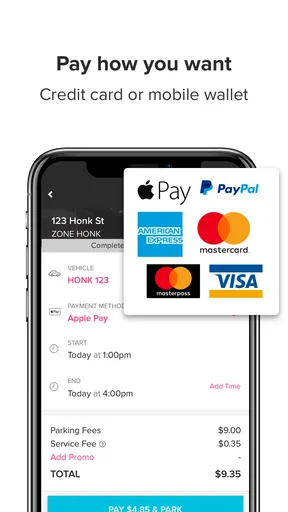
HonkMobile usually allows users to save a supported credit or debit card and pay through the app, although available payment options can vary by region and parking operator. The total price may include the parking rate plus applicable service, convenience, or local fees, which should be shown before confirmation. Refunds, cancellations, and billing corrections are generally subject to the specific location’s policies, so review the receipt and terms carefully.


